A valid UK eVisa 2026 (ETA) is now the only way for most travelers to prove their right to enter Great Britain. As of February 25, 2026, the Home Office has fully transitioned to a “ETA / Digital-Only” border. If your current passport is not correctly linked to your UKVI account, airlines will receive a “Negative” response from the automated check-in system, and you will be denied boarding—even if you have a valid visa.
Linking your passport is a technical “handshake” between your identity document and the UKVI database. As a cybersecurity professional, I have analyzed this process: it relies on a secure data sync that must be completed at least 72 hours before travel to ensure your status is visible to carrier API feeds.
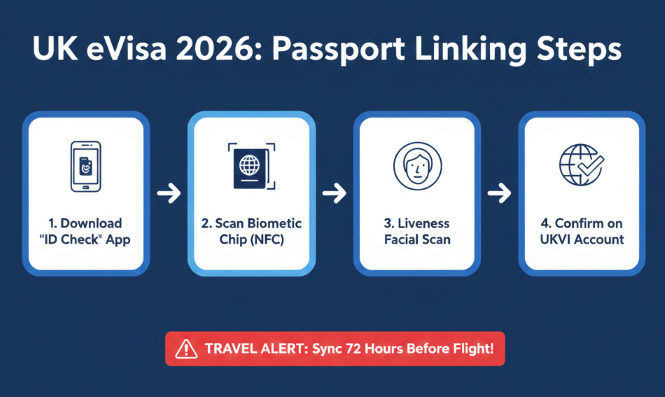
This technical update is a critical part of understanding your broader UK Visas and Work Rights 2026 in a digital-first immigration system.”
1. Why You Must Link Your Passport Before February 25, 2026
The UK eVisa 2026 mandate means your physical BRP or vignette is no longer a valid travel document on its own. The “View and Prove” service is now integrated directly with airline departure control systems.
- Automatic Denied Boarding: Carriers are now legally required to deny boarding if the digital status does not match the passport presented.
- The “New Passport” Trap: If you renewed your passport recently, your eVisa is likely still linked to your old document. You must manually add the new one to avoid being “invisible” to the border system.
Before we dive into the technical steps, it is essential to understand the wider landscape of the UK’s 2026 Digital Border. As of February, the Electronic Travel Authorisation (ETA) system has expanded significantly. This video provides a critical update on who needs an ETA, how it interacts with your eVisa, and the common pitfalls travelers are facing this month.
2. Step-by-Step: Linking Your Passport to Your UKVI Account
Follow this technical sequence to ensure a successful link:
- Access the ‘Update Details’ Service: Log in to the official Update your UKVI account details portal.
- Select ‘Identity Document’: Choose the option to “Add a new identity document.”
- The ‘ID Check’ App Sync: You will be prompted to use the UK Immigration: ID Check app.
- Pro Tip: Use a smartphone with NFC (Near Field Communication) enabled. If the chip won’t scan, try the “Read ID Me” app first to locate the exact position of the biometric chip in your passport.
- Facial Verification: The app will take a “Liveness” scan. Ensure you are in a well-lit area with a plain background.
- Final Submission: Once the app confirms the scan, return to the browser and click “Submit.”
3. 2026 Processing Times & Travel Readiness
Do not wait until the day of your flight. The backend synchronization between UKVI and the Carrier Support Hub is not always instantaneous.
| Action | Recommended Timeframe | Technical Status |
| Passport Renewal | 3 Months Before Expiry | High Priority |
| UKVI Account Update | 10 Days Before Travel | Essential |
| Share Code Generation | 72 Hours Before Travel | For Manual Backup |
| Airline Check-in | 24 Hours Before Travel | System Verification |
4. Troubleshooting: eVisa Not Showing?
If you have linked your document but receive an “Account not found” or “Details mismatch” error:
- Check the Name String: Ensure your name matches the “Machine Readable Zone” (the <<< symbols) at the bottom of your passport exactly.
- Clear Browser Cache: Technical observers note that old session cookies can interfere with the “View and Prove” login. Use Incognito/Private mode.
- Carry Old Documents: If you updated your passport within 48 hours of travel, the Home Office recommends carrying your old passport as a secondary verification for the airline agent.
Sometimes a visual guide makes all the difference. In this 4-minute technical walkthrough, you can see the exact interface of the UKVI ‘Update Details’ portal and the ID Check app in action. Follow along to ensure your biometric chip scans correctly and your account synchronization is confirmed without errors.
UK eVisa 2026: Frequently Asked Questions
Q: Do I need to link my passport if I have a BRP?
A: Yes. Since October 2025, BRPs are being phased out. For travel in 2026, you must have a UKVI account with your current passport linked to it.
Q: What if I am a dual British citizen?
A: You do not need an eVisa. However, you must travel on your British passport. From February 25, 2026, using a foreign passport without a "Certificate of Entitlement" will cause you to be blocked at check-in.
Q: How long does the update take?
A: Most digital updates are instant, but manual reviews (if the app fails) can take 5–10 working days.
