A UKVI account is the mandatory digital foundation for managing your immigration status in the United Kingdom. Since the full transition to a “Digital-First” border on January 1, 2025, physical documents are no longer valid for travel or residency checks. You must have a correctly configured account to link your biometric identity to the Home Office database. This checklist outlines the requirements to ensure your eVisa is active and accessible before the upcoming February 25, 2026, travel deadline.
Pre-Setup: Technical Requirements
Before beginning the registration, gather the following items. Based on current system observations, having these ready prevents session timeouts and verification failures.
- Current Biometric Passport: This must be the document linked to your current leave to remain.
- BRP or UAN: Your Biometric Residence Permit number or the Unique Application Number from your visa approval.
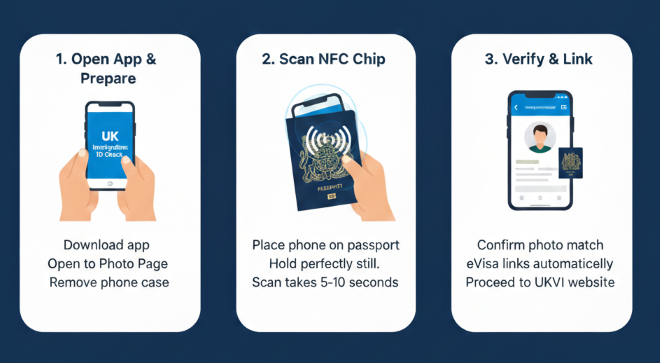
- NFC-Enabled Smartphone: Necessary for the “UK Immigration: ID Check” app to verify your identity.
- Personal Email Access: Use a permanent address rather than a temporary work or student email.
Step-by-Step Setup Checklist
| 1 | Access the eVisa Portal | Visit the official GOV.UK eVisa service. |
| 2 | Identity Verification | Use the mobile app to scan your face and the passport’s NFC chip. |
| 3 | Link Your Status | Connect your immigration records to your digital profile. |
| 4 | Security Authentication | Enable Two-Factor Authentication (2FA) for account protection. |
| 5 | Status Review | Log in to “View and Prove” to confirm your photo and expiry date. |
Watch: 2026 UKVI Account Creation Tutorial
If you encounter difficulties during the identity verification phase, this video demonstrates the interface and navigation of the current system.
Technical Note: Pay close attention to the NFC Chip Scan and the Passport Synchronization sequences. These stages are where most connectivity errors occur.
Troubleshooting Common Setup Issues
For a successful setup, be mindful of these three common friction points identified in the 2026 portal:
- NFC Connectivity: The NFC chip is typically located in the passport’s back cover or the middle photo page. If the app fails to read it, place the phone directly on the document without a protective case.
- Duplicate Profiles: If you previously held a UKVI account for a different visa type, do not create a new one. Use the “Update your details” function to merge your new status into your existing profile.
- 2FA Delivery: If SMS codes are delayed, consider switching to an Authenticator App in your account settings for more reliable access.
Frequently Asked Questions
Can I set up an account without a biometric passport?
If your passport does not have a biometric chip, you may need to use your BRP card (if still within the 2025-2026 transition window) or attend a UKVCAS service point for manual verification.
How do I prove my status to an employer after setup?
Once your account is active, use the "View and Prove" service to generate a Share Code. This 9-character code is what employers use to verify your Right to Work.
Does my eVisa expire?
Your eVisa remains valid as long as your underlying immigration leave is active. However, you must update your account details immediately if you receive a new passport, as your digital status is "anchored" to your document number.
